
Commissions & pay

Pay reps right, every single time.

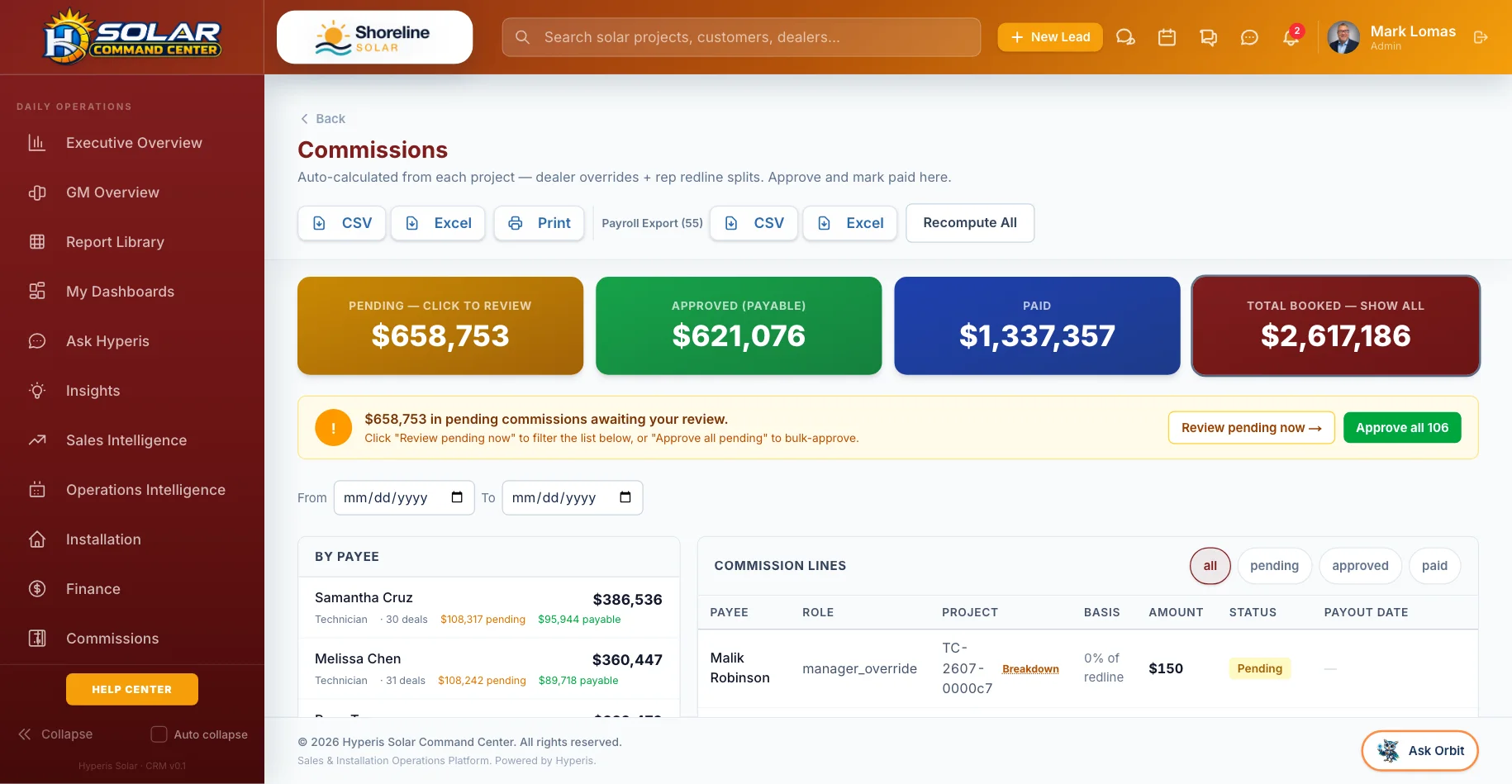
Commissions calculate themselves the moment a deal is signed and become payable at install or funding. Redlines, splits, overrides, clawbacks and W-9s are handled — and every line is explained to the rep.

Calculated at signingClawbacks by policyW-9 before payout
Command Center: Commissions — Calculated, approved and paid, with clawbacks tracked
5

commission plan types, from per-watt to PPW spread

3

redline modes across five lead-source categories

3

clawback policies, with an offset ledger

W-9

requested automatically before anyone is paid

What’s included

Commissions reps trust.

The money side is built in, not bolted on — and transparent pay is how you keep your best people.

Five plan types

Per-watt, percent of gross, percent of net, flat and price-per-watt spread — with setter, closer and self-gen splits.

Overrides

Dealer, manager and sales-manager overrides calculated alongside the rep’s pay.

Redlines by lead source

Manual, price-per-watt floor or percent of sale, across five lead-source categories, with a minimum-commission floor.

Upload your plan

Upload a commission plan as a spreadsheet, PDF or photo and AI turns it into a plan in Hyperis.

Clawbacks by policy

Choose from three clawback policies; clawbacks are tracked in a ledger and offset against future pay.

Built in

Paid on the right milestone

Commissions fire at contract and become payable at install for cash deals or at funding for financed ones.

Setter, D2D and surveyor pay

Separate pay plans for setters, door-to-door reps and surveyors, plus a bonus engine.

Built in

W-9, 1099 and payroll

W-9s requested automatically above the IRS threshold, a year-end 1099 view and a payroll CSV export.

QuickBooks Online

Customers, invoices, payments, 1099 vendors and expenses sync to QuickBooks — net of clawbacks.

Real screens

See it in the product.

Live app screens from a demo solar company — click any screen to see it full size.

Solar Pro: Rep commissions — What each rep earned, when it pays, and why
Rep commissionsWhat each rep earned, when it pays, and why
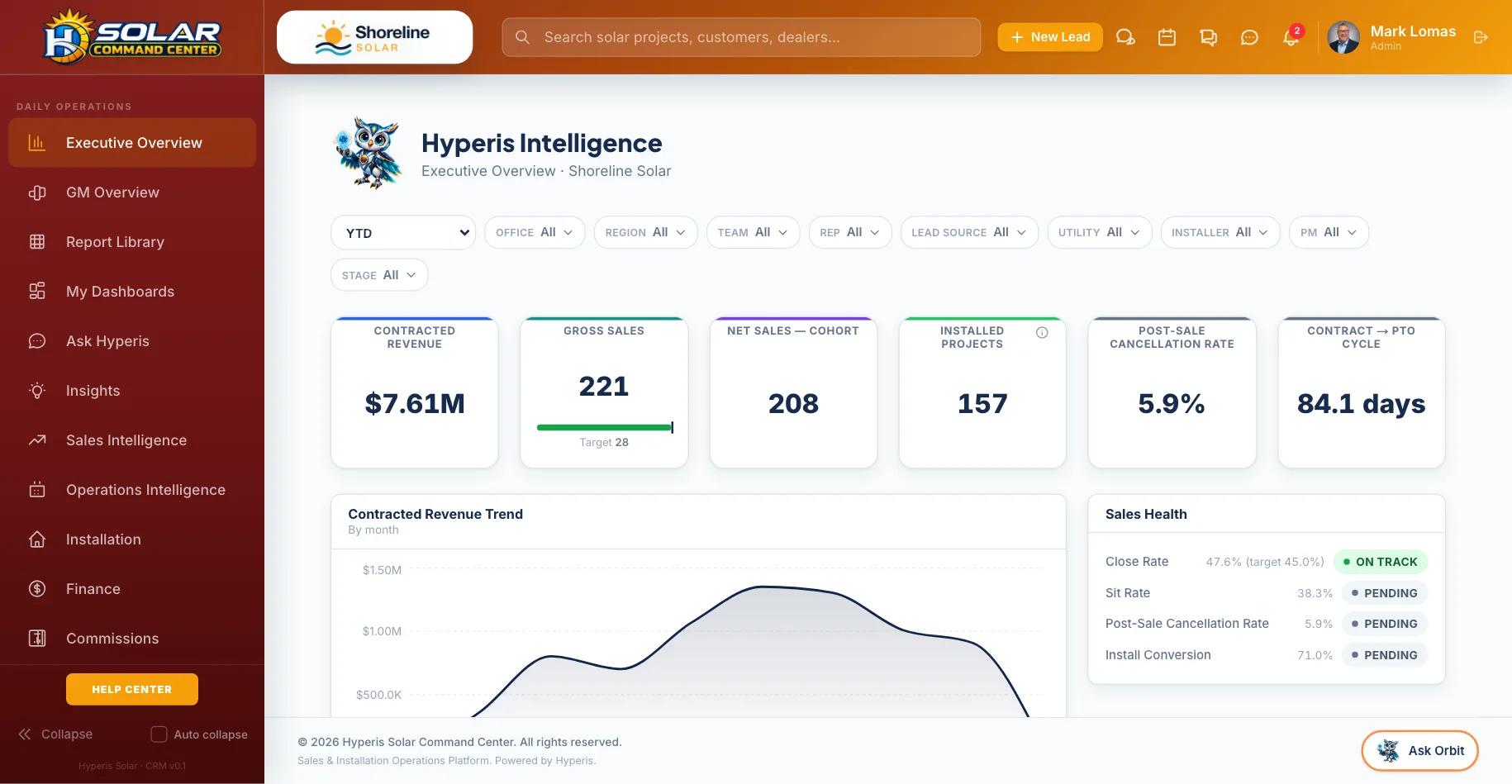
Command Center: Executive Overview — Sales, installs, PTO and cash on one screen
Executive OverviewSales, installs, PTO and cash on one screen
How it works

Three steps, no spreadsheets.

1

Set the plan

Build plans in Hyperis or upload yours and let AI read it.

2

Sign the deal

Commission lines calculate the moment the contract is signed, with splits and overrides.

3

Pay with confidence

Approve, pay and sync — W-9s collected, clawbacks offset, every line explained.

Where you’ll find it

Part of the whole platform.

It runs on the same data as everything else in Hyperis Solar — nothing to connect, nothing to re-key.

Hyperis Solar Command Center
Flagship platform

Sales & installation operations platform

Run the entire solar operation from first lead through design, permitting, installation, funding, PTO, service and customer experience.

  • Sales CRM, pipeline & proposals
  • Design, permitting & utility workflow
  • Dispatch, crews & inspections
  • Equipment, orders & job costing
  • Commissions, invoicing & QuickBooks
  • Dashboards, KPIs & report library
Explore Command Center
Hyperis Solar Pro
Sales organizations

Team expansion & management platform

Built for solar organizations focused on recruiting, managing, coaching and scaling sales teams without carrying installation operations.

  • Team leads, pipeline & customers
  • Manager dashboards & performance
  • Commissions, contests & incentives
  • Calendar, follow-up & sales activity
  • Book visits with your installer partners
  • Upgrade path into Command Center
Explore Solar Pro
Hyperis Solar Connect
Independent consultants

Independent sales & customer platform

A focused workspace for independent solar professionals who need a professional CRM, customer experience, referrals and installer connectivity.

  • Personal lead & customer CRM
  • Appointments & follow-up
  • Projects across installer partners
  • Customer communication tools
  • Ambassador & referral management
  • Upgrade path into Solar Pro
Explore Connect
FAQ

Questions, answered.

Can it match our existing plan?

Five plan types, splits, overrides, redline modes and bonus plans cover most structures — and you can upload your current plan for AI to read.

What happens when a deal cancels?

Clawbacks follow the policy your company chooses, are tracked in a ledger and offset against future pay. Lines are voided, never silently deleted.

Do independent consultants get this?

Connect tracks a consultant’s own earnings — projected, paid and net after outside costs — per installer.

See it with your pipeline.

A 30-minute walkthrough with someone who knows solar. Bring your questions — we’ll show you the real screens, not slides.